Interactions and Machines
 For all of the activities under this heading, you will need to download and read
Interactions in Machines Part 1 activity
sheet (pdf). Use the format in this sheet to analyze interactions in the
machines you study, design or build. For all of the activities under this heading, you will need to download and read
Interactions in Machines Part 1 activity
sheet (pdf). Use the format in this sheet to analyze interactions in the
machines you study, design or build.
If you have completed Unit 3 Cycle 1 Activity 12 (Simple Machines), you could
also identify some or all of the simple machines that make up the more complex
machine you studied, designed or built. Use the format outlined in
Interactions in Machines Part 2 activity
sheet (pdf).
 Analysis of a Machine Analysis of a Machine
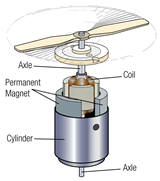
Examine a machine in terms of interactions, energy and forces. The machine could
be an electronic appliance, an engine, a purely mechanical device, or any
other appropriate piece of hardware.
Find as many interactions as possible in the machine, and identify both the interacting objects and interaction types. After you identify the interactions, analyze the interactions using energy diagrams. For mechanical and gravitational interactions, draw force diagrams as well. For all interactions, provide evidence of the interactions.
If you have completed Unit 4 Cycle 2 Activity 8, analyze the machine (especially
an electrical device or an engine) for energy efficiency and describe how
the energy efficiency of the device might be improved. See
Interactions in Machines Part 2 activity
sheet (pdf).
Partners: This activity is a good project for teams of two or
more. Two or more partners might be able to probe the workings of a complex
machine in greater depth than a single person could.
Constructing a Machine
Design and/or build a Rube Goldberg-style machine and analyze it in terms of interactions, energy and/or forces. The basic idea behind a Rube Goldberg machine is that you build a complex machine to perform a simple task. See examples of Rube Goldberg machines on-line by doing a Google search using
"Rube Goldberg" as your search criterion. You may do either a text
search or an image
search.
Identify as many interactions as possible in the machine you have designed or built. After you identify interaction types, analyze the interactions using energy diagrams. For mechanical and gravitational interactions, draw force diagrams as well. For all interactions, provide evidence of the interactions.
Partners: This activity is an ideal project for teams of
two or three. If you look at some of the examples of Rube Goldberg machines
available on-line, you'll notice that in general, they are both imaginative
and rather silly. If you have a partner (or two), you have someone you can
brainstorm with, and in all likelihood, you and your partner(s) would come up
with a device that is both more inventive and ridiculous than you would come
up with by yourself!
Mousetrap Cars
A mousetrap car is a toy car that uses only one mousetrap for propulsion.
The goal of the assignment is to build a car that either goes the greatest
distance or the fastest speed. You can start by researching "mousetrap cars" on-line (Google text
search, image
search).
Then design and build a mousetrap car, and analyze your car in terms of efficiency identify the interactions, draw energy diagrams and draw force diagrams. If more than one student
or team does this project, your teacher could stage a race between the cars and offer a small prize for the winner. Discuss how you would improve your design.
Identify the interactions that occur in the mousetrap car. After you identify interaction types, analyze the interactions using energy diagrams. For mechanical and gravitational interactions, draw force diagrams as well. For all interactions, provide evidence of the interactions.
Partners: This activity is a great two-person project. A
partner gives you someone with whom you can brainstorm ideas, and work
together to build the coolest, fastest or farthest-going car in your class!
|
